Shlix AI does the reading, sorting, routing and drafting. Your team does the judging. Here is exactly what happens to a request — and where a person is always in control.
From the email
From the sample
From your AMS
A person decides
Done and on record
Shlix IBS · Task
A certificate, checked step by step · demo workspace
01Connect
Connect your agency inboxes
Connect your agency email inboxes to help Shlix organize incoming insurance requests and workflows. Access is permission-based and can be revoked through the supported email platform.
Outlook and Microsoft 365
Permission-based mailbox access
Revoke access at any time through the supported platform
Step 01 / 08 · Connect
Microsoft 365 · agency service mailbox
Read the mailbox
Send replies in the thread
Your calendar, files and other mailboxesnot requested
Revoke access at any time from Microsoft 365.
02Sort
Sort agency work from everything else
Incoming emails are sorted as they arrive: insurance requests become tracked tasks, while personal or unrelated email is excluded from processing and not stored. Which mailboxes and folders are read is agreed with you during setup.
Topics you mark as private are always excluded
Unclear emails wait for an owner's one-click decision
Step 02 / 08 · Sort
Inbox · this morning
Zerobyte TechnologiesCOI needed for the Oct 18 event→ Certificate
Jamie (personal)Dinner on Saturday?Private · not stored
Sablewick FabricationAdd a driver to the auto policy→ Endorsement
Online storeYour order has shippedPrivate · not stored
Torvalin Freight LinesPlease cancel policy at renewal→ Cancellation
03Understand
Understand the request. Organize the next step.
Shlix IBS helps identify incoming insurance requests from emails and attachments, including policy servicing, certificates, ID cards, endorsements, cancellations, renewals, billing inquiries, document requests, and follow-ups. Where supported, requests can be matched to relevant customer and policy information.
Configure request categories, approval rules, and due times to suit your workflows.
Route unclear or low-confidence requests for human review.
Step 03 / 08 · Understand
Hi team, please send a certificate for Corvantis Electric Co. showing Zerobyte Technologies as holder, with waiver of subrogation on the general liability policy. Sample attached.
InsuredCorvantis Electric Co.
HolderZerobyte Technologies
WordingWaiver of subrogation
PolicyGeneral liability · in force
04Route
Route it to the right person
Each task goes to the active team member with the least pending work. Urgent requests count double and are always worked first; no customer is tied to one person, so the team shares the load.
Owners can reassign at any time
Who is carrying what is visible on the dashboard
Step 04 / 08 · Route
Certificate · urgent
Open work, weighted (urgent counts double)
AArjun
MMaria
PPriya
Goes to the lightest queue — Priya.
05Draft
Draft the document
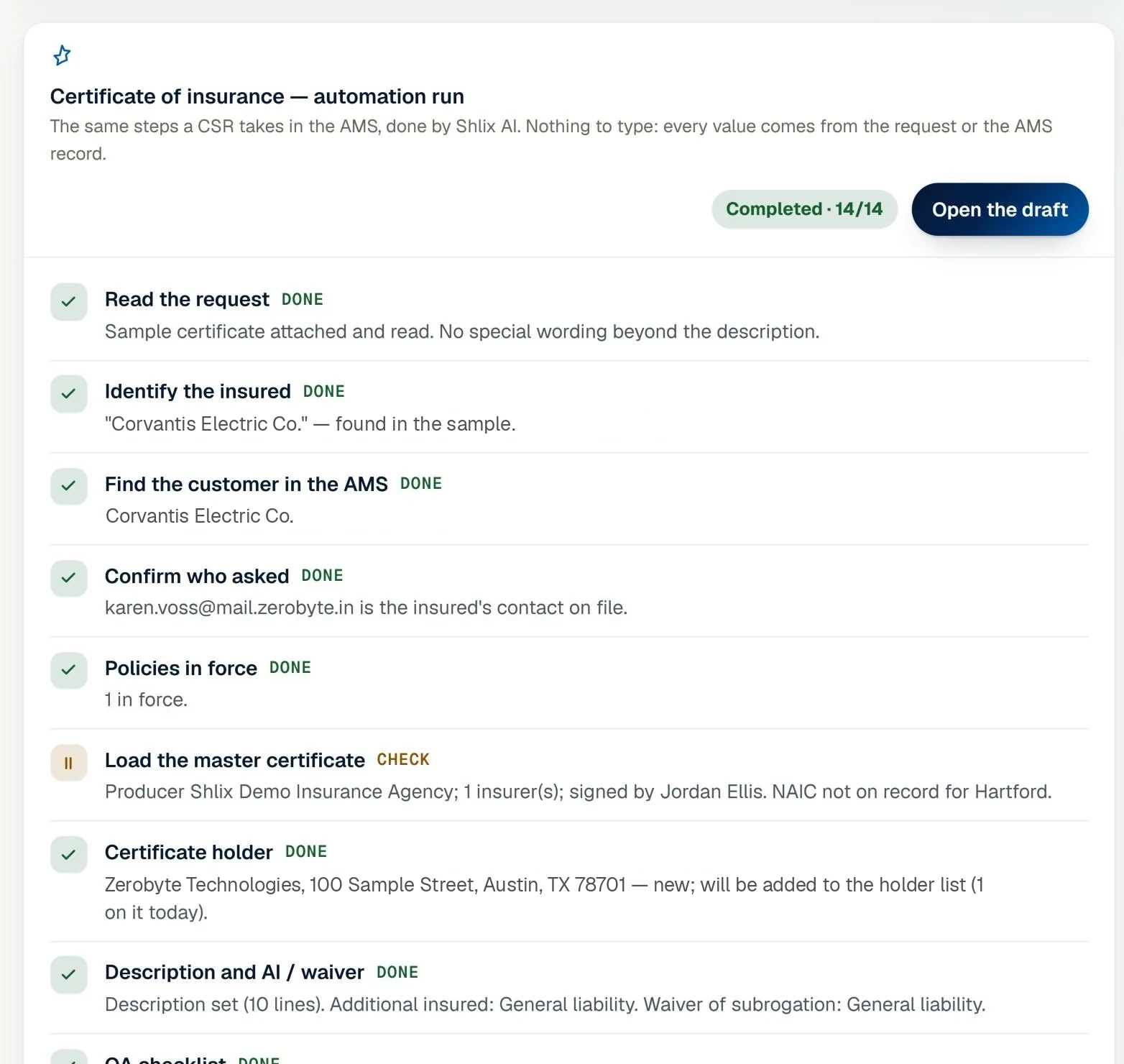
For certificates and ID cards, Shlix runs the same steps a CSR takes in the AMS: finds the customer, checks the requester is the account rep, confirms every policy is in force, takes the holder and wording off the sample, applies additional-insured and waiver lines, and runs a QA checklist.
Every value records where it came from — email, sample or AMS
Any failed check stops the run and asks a person; nothing is guessed
Step 05 / 08 · Draft
06Approve
A person approves
Work that needs an Account Manager waits for one — and never the person who did it. They can approve and send, or send it back with a note that lands with the employee.
Four-eyes approval is enforced, not just suggested
Every step is kept in the task's audit trail
Step 06 / 08 · Approve
MPrepared by Maria
RApproved by Riya
Approved
The person who did the work can never approve it.
Send back with a noteApprove & send
07Send & file
Send, log, and file—your way.
Send responses in the original email thread or create a new, customized email based on the insured's name, document type, policy number, and your agency's requirements. Keep outgoing communications and completed requests organized for easier tracking.
Enable or disable customer emails agency-wide during testing.
Record the channel used to send each response.
Log completed requests and organize emails in the appropriate folder.
Step 07 / 08 · Send & file
Attached COI for your review — please check and let us know of any changes.
Zerobyte Technologies - COI.pdf
PDF
Completed+1
Logged to the customer's certificate history
08Keep the clock
Keep the clock
Each request type has a due time. Work nearing it shows as at risk; past it, Overdue; left too long, it is escalated to the owner overnight. When work is on hold waiting on a carrier or customer, the clock pauses and follow-ups are scheduled.
The day is counted in your agency's timezone
Owners see open work by age and the last seven days against the seven before
Step 08 / 08 · Keep the clock
80%on track
On time12
At risk2
Overdue1
Paused · waiting on carrier1
Step 01 / 08 · Connect
Microsoft 365 · agency service mailbox
Read the mailbox
Send replies in the thread
Your calendar, files and other mailboxesnot requested
Revoke access at any time from Microsoft 365.
Inbox · this morning
Zerobyte TechnologiesCOI needed for the Oct 18 event→ Certificate
Jamie (personal)Dinner on Saturday?Private · not stored
Sablewick FabricationAdd a driver to the auto policy→ Endorsement
Online storeYour order has shippedPrivate · not stored
Torvalin Freight LinesPlease cancel policy at renewal→ Cancellation
Hi team, please send a certificate for Corvantis Electric Co. showing Zerobyte Technologies as holder, with waiver of subrogation on the general liability policy. Sample attached.
InsuredCorvantis Electric Co.
HolderZerobyte Technologies
WordingWaiver of subrogation
PolicyGeneral liability · in force
Certificate · urgent
Open work, weighted (urgent counts double)
AArjun
MMaria
PPriya
Goes to the lightest queue — Priya.
MPrepared by Maria
RApproved by Riya
Approved
The person who did the work can never approve it.
Send back with a noteApprove & send
Attached COI for your review — please check and let us know of any changes.
Zerobyte Technologies - COI.pdf
PDF
Completed+1
Logged to the customer's certificate history
80%on track
On time12
At risk2
Overdue1
Paused · waiting on carrier1
[ Color language ]
Every status, one color.
The same colors on the dashboard, the queue, the task page and the reports — so anyone can read the state of the agency at a glance.
The life of a request
PendingReceived and routed; nobody has started it yet.
In progressSomeone is working on it now (includes QA checks).
Awaiting approvalSubmitted by the employee; waiting for an Account Manager to approve or send back.
Ready to sendApproved and queued to go out to the requester.
CompletedFinished and sent; nothing left to do.
Flags that ask for you
On hold / WaitingPaused while waiting on someone else — carrier, customer or AM.
CancelledClosed without doing the work (duplicate, withdrawn or not needed).
ExceptionShlix AI was not sure enough to route it — a person must decide.
EscalatedRaised for attention by the system or a manager — act on it first.
OverduePast its due time and still open. Shown beside the status, not instead of it.
Cool colors for work moving, warm ones for work that needs you. Blue, violet, teal and green mean the flow is fine; amber, orange, magenta and red mean someone should look.
Never color alone. Every state also has its own icon shape and a word, so it reads for color-blind people and in print.
One meaning everywhere. The same colors on the dashboard, the queue, the task page, reports and the Excel export — and every badge passes 4.5:1 contrast.
[ Around the work ]
Everything a team needs around the task.
The talk, the alerts and the chasing happen on the task itself, so nothing lives in side emails or someone's memory.
Certificate · Acme BuildersAwaiting approval
AK
@Rachel holder and waiver checked, ready for you.
RM
Approved and sent to the requester ✓
Approval waiting on 2 tasks
now
Waiting on carrier · follow-up Thu 9:00
paused
Chat on every task
Owners, approvers and the assigned employee talk on the task itself, live, with @mentions.
Notifications
Approvals waiting, work sent back, Overdue and replies — only for work you can open.
Reports with Excel
Filter by date, person, type, priority or Overdue; each role sees its own scope.
Help & support
Raise a ticket from any task; the Shlix team answers in the same thread.
Your team, your roles
Owners invite employees and approvers; there is no public sign-up.
Follow-ups
Work waiting on a carrier or customer pauses its clock and schedules the chase.
[ How we count ]
Where the numbers come from.
The two numbers we quote across the site, counted from the product itself and checked by a test, so they cannot drift from what it does.
26request types
The library every agency starts with. Each is recognized, routed and timed, and your agency can add its own. Only certificates of insurance (COIs) and auto ID cards are drafted today; the rest are routed, timed and tracked.
3 drafted today23 routed, timed and tracked
Drafted today
Certificate of insurance (COI)
Auto ID card
Certificate of insurance (COI) With Endorsement
Routed, timed and tracked
Cancellation
Reinstatement
Billing
Payment Check
Premium Notice
Carrier Activity
Communication
Claim
Driver add remove
Evidence of property (EOP)
Return Mail
Suspense
Other
Endorsement
AMS Filing
Loss Runs
Audit
New Business
Renewal
Supplemental Application
Quote
Policy
ACORD Submission
14checked steps
What happens to every certificate Shlix drafts: each step passes or stops the run for a person, and each is recorded on the task. Grouped here by where the step's facts come from.
From the email
01Read the request
02Identify the insured
In your AMS
03Find the customer in the AMS
04Confirm who asked
05Policies in force
06Load the master certificate
From the sample, then checked
07Certificate holder
08Description, additional insured and waiver
09QA checklist
10Generate the certificate
A person decides
11Account Manager approval
Done and on record
12Save to the AMS and log the activity
13Reply to the requester with the document
14File the email as done
Any failed check stops the run and asks a person. Nothing is guessed.
Shlix AI automates repetitive back-office work. Its first product, Shlix IBS, is insurance back-office automation for U.S. independent P&C agencies: it reads the service inbox, turns each email into a tracked task, drafts certificates of insurance and ID cards from the agency's own records, routes endorsements, cancellations and renewals, and tracks every deadline. A person approves what matters.
How does Shlix IBS handle unstructured emails and insurance documents?+
Most requests arrive as free-text emails, often with a PDF attached: a sample certificate, a declarations page or a vehicle list. Shlix IBS reads the email and its attachments, works out the request type, and pulls out the details it needs, such as the insured, policy number, certificate holder, special wording or vehicles. Each value is checked against the agency's records. When something is missing, unclear or does not match, the task is flagged for a person instead of guessed.
What does Shlix IBS not do?+
It does not adjust or settle claims. Claim emails are recognized and routed to your team. It does not underwrite, rate quotes, bind coverage or issue policies. Quote and new-business requests are routed to your licensed staff. It is not an agency management system (AMS) or a policy administration system. It works alongside yours. It is built for independent insurance agencies, not for carriers, MGAs or TPAs.
Control, accuracy and trust
Does Shlix AI send anything without a person approving it?+
Shlix AI is designed to keep your team in control of important actions. Depending on your configured workflow, Shlix IBS can receive documents, extract information, prepare drafts and route requests for review. Outgoing communications and other consequential actions should follow your agency's configured approval rules. Automated sending is only enabled where explicitly configured and authorized.
What happens when the AI is unsure about an email or document?+
When Shlix IBS encounters unclear information, missing details or a request it cannot confidently process, it can flag the item for human review according to the configured workflow. Instead of treating every request as successfully completed, the system should make exceptions visible so your team can verify the information and decide what happens next.
How does Shlix AI protect our agency's data?+
Shlix AI is being designed for business workflows that may involve sensitive insurance and customer information. Access permissions, authorized data handling, retention and deletion policies should be defined for each deployment. Before onboarding, we can explain the security controls and data-handling practices applicable to the service. Specific encryption standards, certifications and compliance claims will be provided only where verified.
What happens to emails in my mailbox, including personal or unrelated emails?+
Shlix IBS should process only the mailboxes, folders or messages authorized for the configured workflow. Personal, unrelated or out-of-scope emails should be excluded from processing wherever the configuration permits. Access permissions and mailbox rules are established during setup so the workflow aligns with your agency's operational requirements.
Compatibility and insurance workflows
Which email systems and agency management systems (AMSs) do you support?+
Shlix IBS is intended to fit into your agency's existing email and insurance workflows. Supported systems and integration methods depend on the specific configuration, available APIs, permissions and technical requirements. Contact us with your email platform and AMS details so we can confirm compatibility before implementation.
What types of insurance documents and requests can Shlix IBS handle?+
Shlix IBS is focused on document-heavy insurance back-office workflows, including certificates of insurance (COIs), insurance ID cards and endorsement requests. The exact document types, processing steps and automation capabilities depend on the workflows enabled for your agency. We can assess your requirements during a discovery call and confirm which processes are supported.
Can I use Shlix IBS with my existing team and workflows?+
Yes. The goal is to support your existing team and processes rather than force your agency to adopt an entirely new way of working. During onboarding, we review how requests arrive, how documents are handled, who performs each step and where approvals are required. We then configure supported workflows to fit your operational requirements, subject to system compatibility.
Can Shlix IBS handle complex requests or exceptions?+
Shlix IBS is designed to help organize and process eligible requests while making exceptions visible. Requests involving missing information, unusual requirements or unsupported scenarios can be flagged and routed for human review. Complex coverage decisions, policy interpretations and other matters requiring professional judgment remain with your agency's appropriately authorized personnel.
Processing, reporting and support
How long does Shlix IBS take to process a document?+
Processing time depends on the document type, number of pages, document quality, workflow complexity and any additional checks required. Shlix IBS is designed to automate eligible steps such as document intake, information extraction, classification and task routing. Straightforward documents may be processed faster than complex requests requiring additional review. During a pilot, we can measure processing times using representative documents from your agency.
Can I see how my team is doing and track processed requests?+
Shlix IBS aims to give agencies better visibility into their document workflows and request status. Depending on the features enabled in your deployment, reporting can cover processed requests, pending items, exceptions and workflow activity. Available dashboards, metrics and reporting capabilities will be confirmed during the product demonstration.
How long does it take to get started with Shlix IBS?+
Implementation time depends on your email environment, supported integrations, workflow complexity, access permissions and the level of customization required. A straightforward setup may take less time than a deployment involving multiple workflows or custom integrations. After an initial assessment, we will provide an estimated implementation timeline and identify the prerequisites for getting started.
Does Shlix AI provide human back-office support?+
Yes. Shlix AI's business model offers the flexibility to choose software automation, optional human operational support or a combination of both. Human support can help with agreed processing tasks, exception handling and operational follow-ups, depending on your selected plan. The scope, service hours, workload limits and responsibilities are defined before the service begins.
Pricing and getting started
How much does Shlix IBS cost?+
Shlix IBS offers flexible pricing designed around your agency's needs. Software-only plans start at $299 per month, plans that combine the software with our back-office team start at $1,449 per month, and our team on its own starts at $1,099 per month for up to 20 hours a week. Final pricing depends on your job types and their complexity, your volume, integration requirements and level of human support. Contact us to discuss your requirements and receive a tailored proposal.
Can I try Shlix IBS before committing to a subscription?+
We recommend starting with a discovery call to understand your current processes, document volumes and automation needs. Where available, a pilot can be scoped around representative documents and selected workflows to evaluate processing performance, exception handling and operational suitability before a wider rollout. Pilot availability, fees, scope and duration will be confirmed during the discussion.
Will Shlix IBS change anything in our agency management system or existing records?+
Shlix IBS workflows should operate within the permissions and actions explicitly authorized for your deployment. Any ability to create, update or write information back to an external system depends on the supported integration and configuration. During onboarding, we identify which actions are read-only, which can prepare drafts and which require authorization before changes are made.